NaStudio: Mobile studio manager for photography businesses
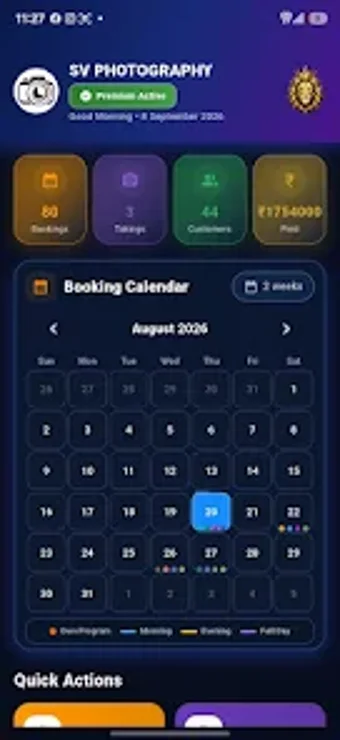
NaStudio, developed by SREE VARMA, is a mobile business manager designed for photography studios and freelance photographers. The app centralizes administrative work by handling bookings, client records, programs, albums, and transaction tracking inside a single Android interface. It includes cloud backup and account-based security to keep studio data recoverable and separated per user. Professional photographers and small studio owners gain a mobile-first tool for shifting administrative tasks off paper and into a single app.
What NaStudio is built to do for studio administrators
NaStudio acts as a photography studio management suite on Android, targeting the administrative side of a creative business. It focuses on scheduling shoots and maintaining client databases rather than image editing. The app groups studio profile data, booking entries, program definitions, album records, and transaction logs so a studio operator can control core business information from one mobile device without resorting to separate spreadsheets or paper ledgers.
How booking, client, and program workflows are structured
The app organizes the primary studio workflow into discrete modules: booking management captures event and customer details, program management stores package definitions, and album management links projects to client records. This design supports a linear workflow from inquiry to delivery, so a studio can use the app to record bookings, assign a package, and tie a finished album to the original client entry in a single record chain.
How approachable the interface and onboarding are for practitioners
The interface targets mobile-first use by photographers and studio owners, reducing the need for a separate desktop. Account-based security ties each studio’s data to a user account, which helps with data isolation during onboarding. The app’s focus on discrete studio tasks means prior studio experience helps; photographers new to digital administration may depend on the app’s guided screens rather than advanced customization options.
Data safety, compatibility, and deployment limits for teams
Cloud Backup and restore features provide recoverability for studio records, and account-level isolation keeps data separate between users. The Android-only delivery suits solo owners and small teams that operate from mobile devices. Larger studios that require shared desktop access or multi-user permission controls beyond per-account segregation may find the mobile-only approach restrictive for enterprise-style collaboration.
Who should adopt NaStudio and who should look elsewhere
NaStudio is a practical option for solo photographers and small studio owners who prefer handling administration from an Android device and value account-level data separation. Professionals needing desktop-based shared workflows or advanced multi-user permission controls should evaluate alternatives that offer cross-device team management. For mobile-focused studio operators seeking a compact administrative tool, the app is a sensible match.